

How to build- The Model Context Protocol (MCP) - Part 1
A Catalyst for AI Interoperability and Scalable LLM Integration
The Large Language Model (LLM) boom has redefined how humans interact with technology.
We see how natural language is a new programming paradigm as LLM and AI models are now at the center of every new enterprise architecture development.
However, the rather scattered enterprise landscape is very complex to navigate with just natural language and LLM. The reason is that LLM requires the right context to provide a valuable response.
Moreover, the real value of LLM is not only to analyze data and provide valuable insights but also to take action based on the insights. This is called Actionable AI.
Without the right context, LLM is not capable of generating or retrieving meaningful information or performing practical operations.
Hence, standardizing interoperability across diverse enterprise components and AI is necessary to provide the right context for LLM, enabling Actionable AI through the Large Actions Model (LAM).
The Model Context Protocol (MCP) bridges this gap by enabling access to various applications and data sources, thereby enhancing its versatility and context-awareness.
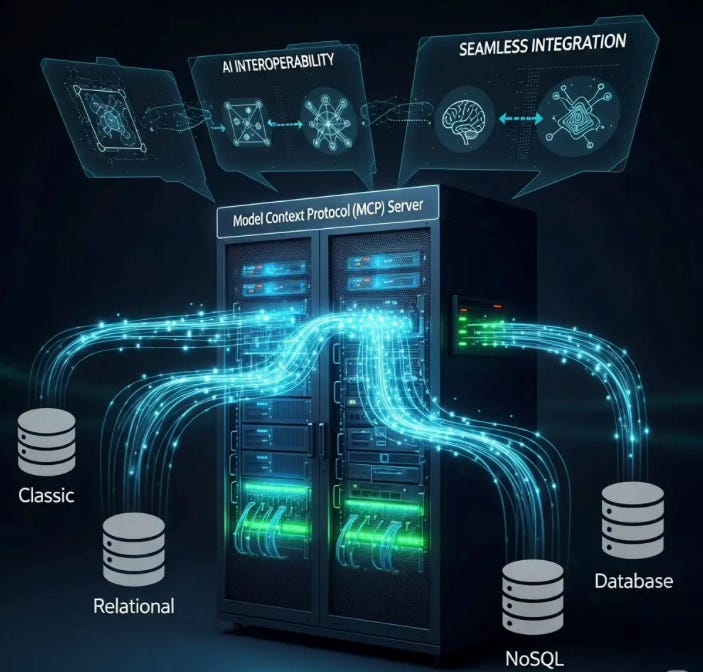
MCP is an open protocol that standardizes how applications provide the context to the LLM.
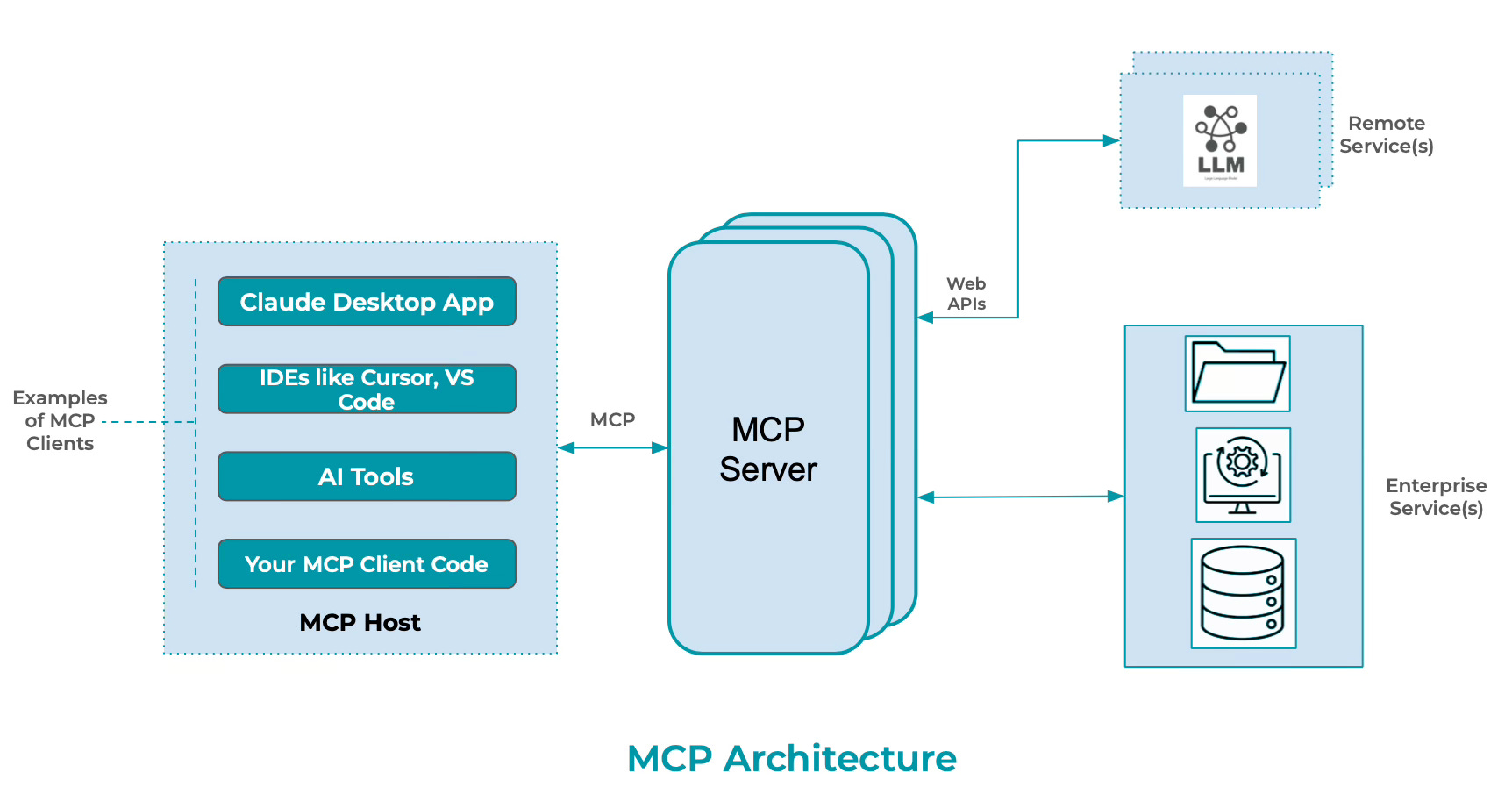
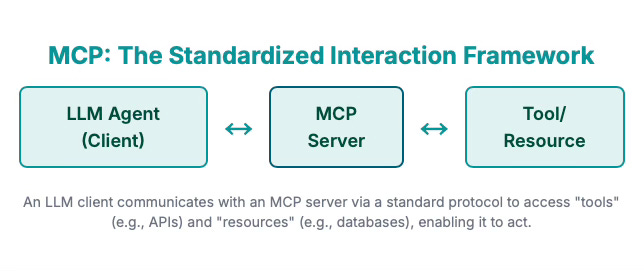
The standardized interaction framework of MCP has the following core components -
LLM Agent or Client - Provide an interface to the user with a reusable template, such as a 'Prompt'. For example: a prompt to "Show all tables from database «database_name»". The user can explicitly invoke this prompt by providing a specific database name.
There are two standard functions used to provide context referencing available tools and resources.
prompt/ list- Discovers available prompts and returns a list of prompt descriptors.
prompt/ get- Retrieve prompt details with definition and its arguments.
MCP Server - It exposes specific capabilities to AI applications through standardized protocol interfaces. A database server acts as a resource for data queries, responding to them in natural language using LLM.
Tools - They enable AI models to perform actions through server-implemented functions. Based on the database schema and the natural language input, the function will perform tasks like validation of input or through LLM integration convert the natural language input into a SQL Statement.
Resources - Provides access to the requested information in a structured way by accessing the resource data and providing it to the AI model as a context, like a database returning query results for the query that was converted by Tools using LLM integration.
With this understanding of MCP and its core components, the goal of this article is to provide a working prototype of the MCP Server that interacts and retrieves data from the MySQL Server using natural language.
The details of the project are as follows-
Collaborative AI is the ability of diverse AI components and models and autonomous agents to communicate, interact, and work together seamlessly and coherently to achieve complex tasks and shared goals. To know more about Collaborative AI here is a link to my recent post on Substack. 🎯Objective -
To create a simple Model Context Protocol (MCP) server using Python.
The MCP Server facilitates interaction with the MySQL database through natural language or direct SQL queries.
Following are the details regarding the understanding of the project setup, build and deployment, environment and test setup.
🏗️ Modular Architecture
The code is organized into logical modules:
config.py - Configuration management with environment variable support
database.py - MySQL connection and operations with caching
llm_client.py - LLM integration supporting OpenAI and Ollama
nlp.py - Enhanced natural language processing using LLMs
server.py - MCP server implementation with advanced tools
main.py - Application entry point with proper error handling
The VS Code project structure is as follows-
|-- data
|-- notebooks
    |-- "all python notebooks used to build and test the .py scripts"
|-- scripts
    |-- .env
    |-- "all .py files listed above"
    |-- test_examples.py
|-- results
|-- docker-compose.yml
|-- requirements.txt
|-- init.sql
|-- Readme.md
The Project: Here is a link to the project that can be cloned from GitHub.
Disclaimer - Some of the project aspects are "vibe-coded". The goal is to provide a conceptual understanding of MCP Server Implementation, rather than handing over thoroughly tested, production-ready code. With this disclaimer, please feel free to use it for training and understanding purposes only.
🤖 LLM Integration Features
The project demonstrates the use of multiple LLM Providers.
OpenAI (GPT-3.5/GPT-4) Ollama (Local models like Llama2, Code Llama) Extensible architecture for additional providers
The goal is to use OpenAI API as a primary provider and switch over to Ollama local models as a secondary choice.
Here is a code snippet from config.py to define the LLM Configuration-
@dataclass
class LLMConfig:
    """LLM configuration"""
    provider: str = "openai"  # openai, anthropic, ollama
    api_key: Optional[str] = None
    model: str = "gpt-3.5-turbo"
    base_url: Optional[str] = None  # For local models like Ollama
    max_tokens: int = 1000
    temperature: float = 0.1

    @classmethod
    def from_env(cls) -> 'LLMConfig':
        """Load LLM configuration from environment variables"""
        return cls(
            provider=os.getenv('LLM_PROVIDER', 'openai'),
            api_key=os.getenv('LLM_API_KEY'),
            model=os.getenv('LLM_MODEL', 'gpt-3.5-turbo'),
            base_url=os.getenv('LLM_BASE_URL'),
            max_tokens=int(os.getenv('LLM_MAX_TOKENS', '1000')),
            temperature=float(os.getenv('LLM_TEMPERATURE', '0.1'))
        )
🫙 Database Features
The project uses Docker Compose to download the MySQL 8 image and initialize it with the SQL tables required for the project. The init.sql file contains all the DDL and DML statements required for database setup.
The config.py and database.py have details to initialize the database connection to the MySQL container deployed in Docker.
Here is a code snippet from database.py
class MySQLConnection:
    """MySQL database connection handler"""

    def __init__(self, config: DatabaseConfig):
        self.config = config
        self.connection = None
        self._schema_cache = {}

    def connect(self) -> bool:
        """Establish database connection"""
        try:
            self.connection = mysql.connector.connect(
                host=self.config.host,
                port=self.config.port,
                database=self.config.database,
                user=self.config.username,
                password=self.config.password,
                autocommit=False
            )
            logger.info(f"Connected to MySQL database: {self.config.database}")
            self._load_schema_cache()
            return True
🛠️ SQL operations
execute_sql - Direct SQL execution with optional explanations ask_database - Natural language database queries with AI get_schema_info - Comprehensive schema exploration optimize_query - AI-powered query optimization
Built-in Security:
SQL injection protection, Dangerous operation warnings (like warning on drop, delete, insert, or update statements), Input validation based on built-in guardrails to govern the natural language input and avoid sending garbage inputs to LLM to result in failure due to syntax error or invalid SQL request.
🗣️ Natural Language Processing:
Context-aware SQL generation using database schema Query validation and confidence scoring Natural language explanations of results Query optimization suggestions
Here is a code snippet from nlp.py.
def _validate_sql_query(self, sql_query: str) -> Dict[str, Any]:
        """Validate generated SQL query"""
        warnings = []
        confidence = "medium"

        # Check if it's an error message
        if sql_query.startswith("--"):
            return {"confidence": "none", "warnings": ["Query generation failed"]}

        # Basic SQL validation
        sql_lower = sql_query.lower().strip()

        # Check for dangerous operations
        dangerous_keywords = ["drop", "delete", "truncate", "alter", "create"]
        if any(keyword in sql_lower for keyword in dangerous_keywords):
            warnings.append("Query contains potentially destructive operations")
            confidence = "low"

        # Check for table existence
        mentioned_tables = []
        for table in self.schema_info.get("tables", []):
            if table.lower() in sql_lower:
                mentioned_tables.append(table)

        if not mentioned_tables and "from" in sql_lower:
            warnings.append("Query references tables not found in schema")
            confidence = "low"

        # Check basic SQL syntax
        if not any(sql_lower.startswith(cmd) for cmd in ["select", "show", "describe", "explain"]):
            warnings.append("Query doesn't start with expected SQL command")

        return {"confidence": confidence, "warnings": warnings}
Handling Prompts
An AI prompt is the fundamental input mechanism used to interact with the AI models.
It is natural language text that describes the task an AI should perform, ranging from a simple query to a complex statement with extensive context, specific instructions, and conversational history.
Prompts must be clear, specific, and provide sufficient context to ensure the model fully understands the request. Here are the steps used in defining a “Generate SQL from natural language using OpenAI” prompt.
Step 1: Intro: Sets the scenario and assigns a distinct role to the AI. In this case, we explicitly assign the SQL expert role to convert natural language into a MySQL query.
Step 2: Context: Provides relevant background information. In this case, a database schema and a natural language query input
Step 3: Instructions: Gives clear directives and constraints. In the example below, the six rules are clear instructions in the form of guardrails to perform the task.
Step 4: Ending: Describes the desired final action. That would be a SQL Query from a natural language, in this case.
async def generate_sql(self, natural_query: str, schema_info: Dict[str, Any]) -> str:
        """Generate SQL from natural language using OpenAI"""
        schema_text = self._format_schema(schema_info)

        prompt = f"""
You are a SQL expert. Convert the following natural language query into a MySQL SQL query.

Database Schema:
{schema_text}

Natural Language Query: {natural_query}

Rules:
1. Return ONLY the SQL query, no explanations
2. Use proper MySQL syntax
3. Use backticks for table/column names if needed
4. Be precise and efficient
5. If the query is ambiguous, make reasonable assumptions
6. For aggregations, include appropriate GROUP BY clauses

SQL Query:"""
Note - Using delimiters like triple quotes ("""), triple backticks (```), or XML tags (<tag></tag>) is highly recommended to separate different parts of a prompt.
This structural demarcation ensures the model accurately interprets and differentiates between various input elements, preventing misinterpretations and enhancing security against prompt injection attacks.
To help users understand the MCP server's supported functions, it is also important to provide a help context.
Here is an example of a prompt with a help context to guide users to the capabilities of the MCP server.
async def handle_get_prompt(name: str, arguments: dict) -> GetPromptResult:
            """Handle prompt requests"""

            if name == "database_assistant":
                context = arguments.get("context", "general help")

                schema_info = self.db_connection.get_database_schema()
                tables_list = ", ".join(schema_info.get("tables", []))

                help_content = f"""
# MySQL Database Assistant

I can help you interact with your MySQL database using natural language or direct SQL queries.

## Available Tables:
{tables_list}

## What I can help you with:

### Natural Language Queries:
- "Show me all customers from New York"
- "Count how many orders were placed last month"
- "Find the top 5 products by sales"
- "List all employees in the marketing department"

### Direct SQL Operations:
- Execute any SQL query safely
- Get explanations of query results
- Optimize existing queries
- Explore database schema

### Database Schema:
- View table structures
- Understand relationships
- Get column information

## Context: {context}

What would you like to know about your database?
"""
📦 Easy Setup
Pre-requisites -
The project will require the following to be installed in your development environment.
Docker Desktop
Python3 & VS Code extension for python
VS Code extension for PyTest
MySQLMCPServer Project - clone it from GitHub. Link provided in the "Modular Architecture" section above.
I have added other project dependencies to the requirements.txt.
Deployment Artifacts -
The following artifacts are readily available to set up a development environment and deploy the project to test the results.
Docker Compose for development environment setup
Sample database schema with test data
Environment variable templates
Requirements file for dependencies
Usage examples and testing code
Running the project
Using the below command, create the necessary containers for MySQL8 and Ollama.
docker-compose up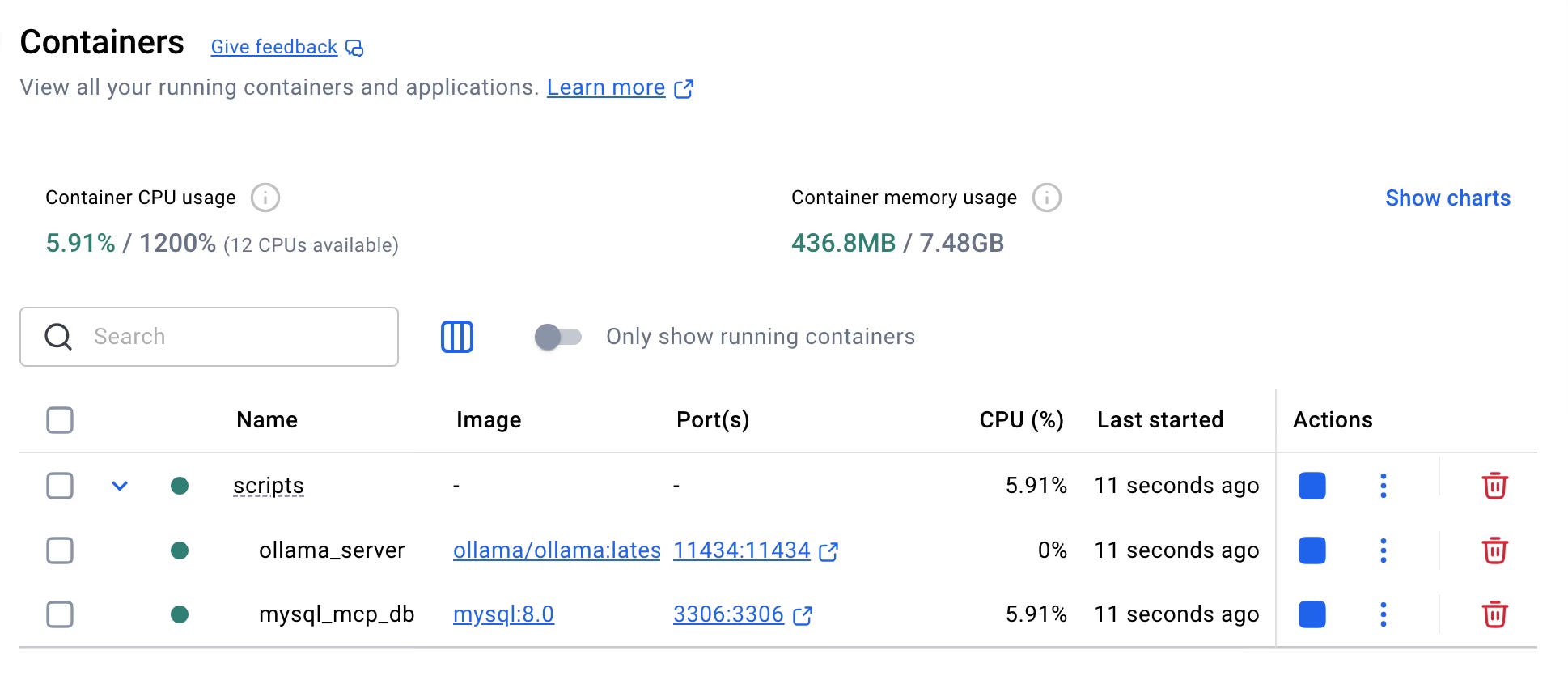
Note: If the init.sql is not executed, you may have to use a SQL client like MySQL Workbench or DBWeaver to run the script manually.
Once the project is setup in the VS Code environment, use the test_examples.py to test the project.
Key Takeaways -
While MCP offers significant advantages of AI interoperability and seamless integrations of LLM and enterprise systems, it also provides:
An open standard to implement and build custom integrations for AI applications
A growing list of pre-built integrations to plug into the LLM of your choice.
Flexibility to adopt and change the integrated apps and LLM without having to reprogram the context
Most importantly, with MCP, the AI agents go beyond the basic capability of Generative AI and enable Actionable AI with a chain of complex reasoning. It translates high-level AI requests into actionable API calls to both internal and external systems.
However, on the flip side, there are several critical considerations and challenges associated with the MCP implementations.
Security and Identity Management - The open standard for MCP does not inherently provide any security measures for authentication and authorization. It relies on external implementation to secure the user authentication. Moreover, MCP cannot clearly determine if the request has originated from an end-user or the AI agent, and if it is a malicious request, hence complicating audit and control over sensitive operations.
Risk of Attacks - There are risks of prompt injections with malicious instructions leading to unintended actions from the LLM. Other risks involved include Shadowing or Mock-up MCP Servers, which can result in intercepting AI requests, tampering with output, or misusing sensitive data. It is important to understand that poorly implemented MCP Servers can facilitate data exfiltration through compromised tools or even enable remote code execution.
Other considerations include Context-Scaling, performance bottlenecks, and offloading application logic onto LLM, which may be overkill.
It is advisable to understand the architecture and concepts of MCP, as well as the open-standard documentation from Anthropic, before exploring the MCP Server implementation further.
In the next "How-to", we will explore the MCP Client Implementation to gain a comprehensive understanding of the implementation.